
Generative UI vs Traditional UI Design: When Should You Use Each?
Generative UI vs Traditional UI — what is the real difference, which industries suit each, and how do you decide? A complete 2026 designer’s guide with a decision framework, real examples, and hybrid strategy.
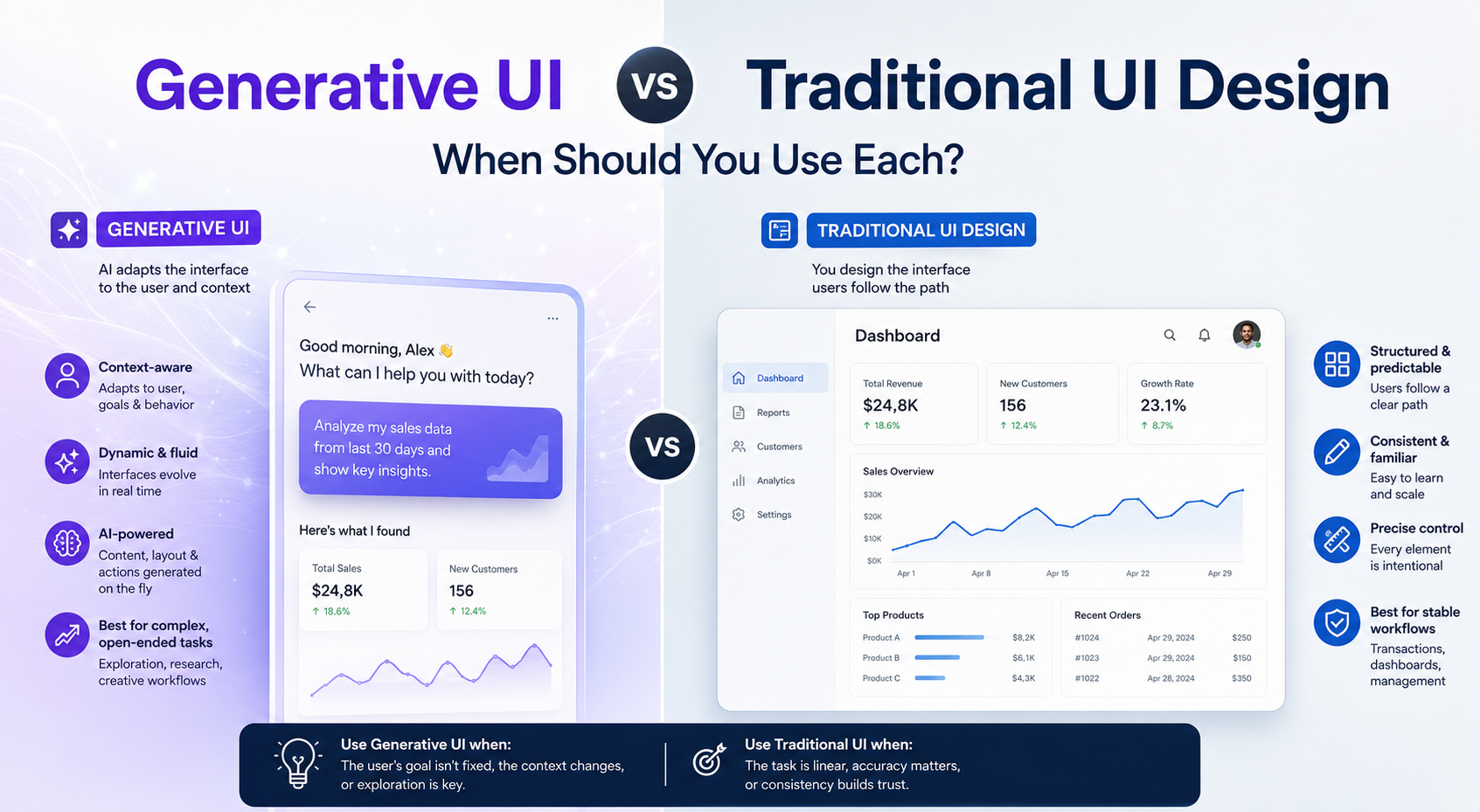
What is the difference between Generative UI and Traditional UI? Traditional UI is built on fixed screens, fixed layouts, and fixed user flows — every interaction is pre-designed and predictable. Generative UI adjusts what information is shown, how it is structured, and what actions are available based on a user’s request, real-time context, and task — dynamically generating interface components at runtime rather than serving pre-built screens. Traditional UI excels where predictability, compliance, and brand consistency are essential. Generative UI excels where tasks are complex, varied, and context-dependent. In 2026, the most effective products use both — a hybrid approach where generative UI handles dynamic, personalised tasks and traditional UI anchors high-stakes, repeatable, or regulated interactions.
Introduction: Two Fundamentally Different Bets About How Interfaces Should Work
Every interface ever built rests on an assumption about its users.
Traditional UI says: “We know what our users need. We will design the optimal path, build it once, and refine it through research and testing over time.”
Generative UI says: “We cannot fully predict what each user needs in each context. We will build a system that figures out the right interface in the moment, for each person, each time.”
Both assumptions are sometimes correct. The mistake that most teams make in 2026 is picking one as a universal truth — and applying it everywhere.
Gartner predicts that 30% of all new applications will use AI-driven adaptive interfaces by 2026, up from under 5% just two years ago. McKinsey data shows companies that excel at AI-driven personalisation generate 40% more revenue than those that do not. These are genuinely significant numbers.
But they sit alongside an equally important finding: AI-powered adaptation fails in specific, predictable contexts — and applying it where it does not belong costs you more in trust and compliance than you gain in personalisation.
This blog gives you a complete, honest framework for understanding both approaches — what each is, where each wins, where each fails, and exactly how to decide which one belongs in your product.
Traditional UI: What It Is and Why It Has Lasted Thirty Years
The Definition
Traditional UI is the design paradigm most designers were trained in. You research users, define flows, design screens, test with real people, and ship a consistent, intentional interface that every user experiences in approximately the same way. The designer controls the experience. The user navigates it.
It is deterministic. What you design is what users see. Every edge case is accounted for in advance. Every interaction has been considered, tested, and refined.
Why Traditional UI Is Still the Right Choice Most of the Time
Traditional UI has persisted for thirty years because its fundamental value proposition is deeply human: predictability builds trust.
Users notice when a system behaves consistently. They notice when learning transfers from one section to another. They notice when updates improve clarity instead of introducing confusion. These qualities build trust in ways that visual novelty cannot.
Tools like Notion, Linear, and Shopify demonstrate this clearly in 2026. They succeed not because they are generating dynamic interfaces on the fly — but because they respect established design patterns, perform fast, and behave exactly as expected every time.
The Genuine Strengths of Traditional UI
1. Complete brand control. Every pixel reflects deliberate design decisions. Colour, typography, spacing, tone — all of it is consistent and intentional, reinforcing brand identity at every touchpoint.
2. Accessibility compliance. Designing a static interface means every accessibility requirement — colour contrast ratios, keyboard navigation, screen reader support, touch target sizes — can be validated against WCAG standards before a single user sees it. Accessibility is a quality standard, not an afterthought.
3. Regulatory and audit confidence. In financial services, healthcare, and legal applications, compliance teams often require review and approval of the exact interfaces shown to users. A fixed, pre-designed interface can be reviewed, documented, and signed off. A dynamically generated one complicates this process significantly.
4. Collaborative and multi-user reliability. When multiple users work in the same product — a team using a project management tool, colleagues reviewing a shared document — a consistent interface ensures everyone sees the same thing, reducing confusion and making collaboration possible.
5. Performance and technical simplicity. Pre-built interfaces load faster, cost less to maintain, and fail more predictably than systems that generate UI at runtime. At scale, this matters.
6. Trust at high-stakes moments. When users are making irreversible choices — financial transactions, legal agreements, medical decisions — a consistent, predictable interface is not just comfortable. It is necessary. The cognitive load of adapting to a changing interface during critical moments increases error rates and user anxiety.
Generative UI: What It Is and Why It Is Changing Everything
The Definition
Generative UI is the discipline of designing interfaces where the UI itself is generated at runtime — by an AI agent, based on the user’s request, context, and task — rather than served from a library of pre-built screens.
Instead of a user navigating a fixed menu structure to find a report, they describe what they want: “Show me Q3 revenue by region, filtered by product category, compared to last year.” The system reads that request, determines what data to pull and what visual format best represents it, and renders an interactive component — a chart, a filterable table, a summary card — right there in the conversation or workflow.
The UI is not retrieved. It is created.
As one industry analysis put it: “Generative UI is the process of connecting the results of a tool call to a React component — enabling interfaces that adapt based on conversation flow and AI responses.” This shift represents the most significant evolution in frontend development since the rise of React.
How Generative UI Actually Works
The process follows a consistent pattern:
- The user enters a goal — a prompt, a question, or the beginning of a task.
- The AI reads context — user role, data available, task history, stated preferences.
- The system decides the response format — not just what to say, but what kind of interface component best serves this response: a form, a chart, a comparison table, a step-by-step flow.
- The component is rendered — interactive and tailored to the specific data and task, not a generic template.
- The user acts on it — refining, querying further, or completing the task.
The UI is not a fixed destination. It is a dynamic response to a dynamic need.
The Three Patterns of Generative UI in 2026
Understanding which pattern you are building helps clarify both the opportunity and the risks.
Pattern 1 — Declarative UI Generation The agent specifies what UI components should appear using a structured spec (like A2UI or Open-JSON-UI). The frontend renders these from a predefined component library. This is the most controllable and most commonly deployed pattern — the components themselves are pre-built, but which ones appear and how they are assembled is generated dynamically.
Best for: Dashboards, admin interfaces, data-heavy workflows where the data is variable but the components are stable.
Pattern 2 — Contextual UI Adaptation The agent modifies an existing interface based on user context — surfacing or hiding elements, reordering content, pre-filling fields, adjusting complexity based on user expertise. The base UI is traditional; the adaptation layer is generative.
Best for: Products serving users across a wide range of expertise levels, onboarding flows, personalised content experiences.
Pattern 3 — Open-Ended UI Generation The agent returns an entire UI surface — HTML, an embedded app, or a fully generated component. The frontend acts primarily as a container. This is the most powerful and most risky pattern.
Best for: Complex agentic tools, MCP-enabled applications, and workflows where the task is genuinely too variable to pre-design.
Head-to-Head: Where Each Approach Wins
Dimension
Traditional UI
Generative UI
Predictability
✅ High — same experience every time
⚠️ Variable — experience changes with context
Brand consistency
✅ Complete designer control
⚠️ Requires strong design system as guardrails
Accessibility
✅ Fully testable before launch
⚠️ Must validate generated outputs dynamically
Regulatory compliance
✅ Auditable, documentable, approvable
⚠️ Complicates audit trails significantly
Personalisation
⚠️ Limited — one flow for all users
✅ High — adapts to each user's context and goal
Complex / variable tasks
⚠️ Rigid — struggles with edge cases
✅ Flexible — responds to what the user actually needs
Speed for standard tasks
✅ Fast — no generation overhead
⚠️ Generation latency adds time
Collaboration
✅ Consistent — all users see the same UI
⚠️ Different users may see different interfaces
Onboarding new users
✅ Learnable, transferable patterns
⚠️ Can be confusing if interface constantly changes
Maintainability
✅ Clear, auditable codebase
⚠️ AI-generated code can be difficult to debug
High-stakes decisions
✅ Stable, predictable, lower cognitive load
❌ Avoid — changing UI at decision moments raises errors
Design system maturity
✅ Works at any maturity level
⚠️ Requires a clean, mature design system to build from
The honest reading of this table: Traditional UI wins on trust, safety, and control. Generative UI wins on flexibility, personalisation, and handling complexity. The question is never which is better — it is which one the specific context demands.
When to Use Traditional UI
Traditional UI is the right choice when one or more of the following are true.
1. You are in a regulated industry
Financial services, healthcare, legal documentation, and government interfaces often require compliance review of the exact screens shown to users. Generating interfaces on the fly complicates audit trails and regulatory approval. In these contexts, a fixed, documented, testable interface is not a design limitation — it is a compliance requirement.
Every AI-influenced decision in a regulated context needs a clear record of which human authorised, accepted, or overrode it. That record cannot live only in a database; it has to be structurally visible in the interface. Traditional UI makes this tractable. Open-ended Generative UI makes it very difficult.
2. Users are making high-stakes, irreversible decisions
Transactions. Legal agreements. Medical consent. Account deletion. When a user is at a decision point they cannot come back from, the interface must be consistent, familiar, and cognitively light. Do not personalise or adapt during high-stakes decision moments. Maintain a consistent, predictable interface. The cognitive load of adapting to a changing interface during critical moments increases error rates and user anxiety.
3. Multiple users share the same interface
When teams collaborate — a product manager and an engineer reviewing the same data, multiple support agents handling the same customer case — they need to see the same interface. Personalisation creates confusion when each person sees different layouts or options. Collaborative tools should prioritise consistency over individual adaptation.
4. Your product is still finding product-market fit
Generative UI makes sense after you understand user needs deeply. Before that point, focus on learning through direct user research rather than attempting to algorithmically predict what users want. A dynamic interface that is personalising the wrong things faster is worse than a static interface that teaches you what users actually need.
5. Your design system is not ready
This is a critical and under-discussed constraint. Generative UI amplifies what is in your design system. If your design system is messy, generative UI will amplify the mess. You cannot generate a coherent, brand-consistent interface from an inconsistent component library. The quality of your generative output is directly limited by the quality of the system it builds from.
When to Use Generative UI
Generative UI is the right choice when one or more of the following are true.
1. Users have variable, unpredictable goals
When different users come to your product needing fundamentally different things — and when you cannot pre-design a satisfactory fixed path for each of them — generative UI creates the flexibility to serve each user’s actual need rather than a designed approximation of it.
Traditional development relies heavily on manual coding, component library maintenance, and static file updates. Generative UI introduces a more flexible, intent-driven approach — significantly faster for standard, data-driven interface components where the data itself is variable.
2. The task involves complex, multi-step workflows
When users are navigating a product to complete a goal that requires drawing from multiple data sources, executing multiple steps, and presenting results in a tailored format — a fixed interface forces users to navigate to the data. Generative UI brings the right interface to the user for the task at hand.
Development teams often need to build admin panels or data-heavy dashboards that follow repetitive patterns. Instead of coding these from scratch, Generative UI frameworks generate the entire interface shell based on API documentation, saving dozens of hours on tedious development while keeping the output consistent with the design system.
3. You need rapid A/B testing and iteration at scale
Marketing teams can request specific interface variants for A/B testing — adding a countdown timer, a new CTA block, a trust signal element — without requiring a full deployment cycle from the core engineering team. Generative UI treats UI as a fluid, reactive layer rather than a static asset.
4. You are building AI-native or agentic products
If your product involves AI agents that are taking actions on behalf of users, the interface needs to reflect what the agent is doing, show reasoning, provide intervention points, and adapt to task state in real time. A static, pre-designed UI cannot represent the dynamic state of an autonomous agent workflow. Generative UI is not optional in this context — it is architecturally necessary.
5. Personalisation is core to your value proposition
Companies that excel at AI-driven personalisation generate 40% more revenue than those that do not. When personalisation is not a feature but a core part of the product’s value — a recommendation engine, a personalised learning platform, a dynamic pricing tool — generative UI enables the kind of contextual adaptation that a static interface simply cannot deliver.
The Decision Framework: How to Choose
Use this framework before your next design or product decision involving UI approach.
Step 1: Map your users’ goal variability
Ask: Do all users come to this product needing to do essentially the same thing, or does each user arrive with a significantly different goal?
- Same goal, same flow → Traditional UI
- Variable goals, variable context → Consider Generative UI
Step 2: Assess the stakes of errors
Ask: What is the worst thing that happens if this interface behaves unexpectedly or generates a confusing output?
- High stakes (financial loss, medical harm, legal risk, irreversible action) → Traditional UI
- Low-to-medium stakes (wrong data shown, task needs to be retried) → Generative UI is viable
Step 3: Check your regulatory context
Ask: Does your product operate in a regulated industry where the exact interface shown to users must be reviewed, documented, and auditable?
- Yes → Traditional UI required
- No → Generative UI is viable
Step 4: Audit your design system maturity
Ask: Is your design system clean, documented, and consistently applied across your product?
- No → Fix this first before implementing Generative UI
- Yes → Generative UI is architecturally viable
Step 5: Assess collaboration needs
Ask: Do multiple users need to see and interact with the same interface simultaneously?
- Yes → Traditional UI or Declarative Generative UI with shared state
- No → Any approach is viable
Step 6: Consider your technical capability
Ask: Does your team have the capability to build, monitor, and maintain the systems that generative interfaces require?
- No → Traditional UI. Do not implement Generative UI without this capability.
- Yes → Generative UI is viable
The Verdict Matrix
If your context is...
Recommended approach
Regulated industry (finance, health, legal)
AI in Design Report 2026
High-stakes irreversible decisions
AI in Design Report 2026
Pre-PMF product still learning user needs
Traditional UI
Immature or inconsistent design system
Traditional UI (and fix the system)
Complex, variable user goals
Generative UI
AI-native or agentic product
Generative UI (required)
Rapid A/B testing and personalisation
Generative UI
Data-heavy, dynamic dashboards
Generative UI
Most real-world products at scale
Hybrid approach
The Hybrid Strategy: How the Best Products Use Both
The real answer for most mature digital products in 2026 is not a choice between Generative UI and Traditional UI. It is understanding which parts of your product need which approach — and building accordingly.
The Recommended Hybrid Architecture
Traditional UI for:
- Navigation, information architecture, and core shell
- High-stakes transaction flows and legal/consent moments
- Collaborative workspaces and shared dashboards
- Onboarding and first-time user experiences
- Any screen that requires regulatory approval
Generative UI for:
- Search results and query-driven data displays
- Personalised content recommendations and feeds
- AI agent task interfaces and status communication
- Complex analytical queries with variable output formats
- A/B testing variants for marketing and conversion optimisation
The ideal workflow in 2026 involves a hybrid approach, where high-complexity “hero” components are hand-crafted for consistency and trust, and the supporting “utility” UI is managed via generative orchestration where speed and flexibility matter more.
The Design System Is the Bridge
The key insight that makes this hybrid work: your design system is not just the library of components. It is the guardrails that allow generative interfaces to stay on-brand, accessible, and trustworthy.
A well-structured design system — with documented tokens, clear component variants, accessibility baked in at the component level — is what allows Generative UI to produce outputs that feel like your product rather than a generic AI-generated interface.
The competitive advantage in 2026 shifts from “who has the best design team” to “who has the best design system feeding their AI.” If your design system is messy, generative UI will amplify the mess. Get the foundation right first.
Real-World Examples in 2026
Understanding the theory is one thing. Seeing it deployed clarifies everything.
Figma (Hybrid): The core Figma canvas — layers panel, toolbar, properties panel — is traditional UI, consistent across all users for collaborative reliability. The AI features (First Draft, Replace Content, design critique) are generative — dynamically producing layout and copy suggestions based on the specific design context. Classic hybrid: stable shell, generative capability layer.
Vercel’s JSON-Render (Generative UI): Marketing teams request specific interface variants for landing pages — countdown timers, CTA variants, layout reorders — which the AI renders as validated components without requiring a full deployment cycle. Pure generative utility for non-regulated, non-collaborative, rapid-iteration use case.
Salesforce Agentforce (Hybrid): The core CRM interface — contact records, pipeline views, reporting dashboards — is traditional UI that compliance teams can audit. The agent interface layer — where AI executes customer service workflows, generates response drafts, and logs autonomous actions — is generative, adapting to each customer case’s unique context and data.
Healthcare Portals (Traditional): Clinical decision support tools and patient record interfaces remain almost exclusively traditional UI in 2026. The regulatory requirement — that every interface shown to clinicians and patients can be documented, audited, and signed off — makes dynamic generation impractical for the core interface. AI assists behind the scenes (flagging anomalies, summarising records) but the presentation layer stays fixed.
E-commerce Personalisation (Generative UI layer over Traditional base): Product pages, checkout flows, and account management are traditional UI. The discovery layer — search results, product recommendations, promotional banners, personalised home screens — is generative, adapting to each user’s browsing history, intent signals, and context in real time.
Frequently Asked Questions
What is the difference between Generative UI and Traditional UI?
Traditional UI is built on fixed, pre-designed screens and flows that every user experiences consistently. Generative UI dynamically creates interface components at runtime based on a user's request, context, and task — the interface adapts to the user rather than the user adapting to the interface.
When should you NOT use Generative UI?
Do not use Generative UI in regulated industries where interface audit trails are required (finance, healthcare, legal). Do not use it at high-stakes, irreversible decision moments like payments or legal agreements. Do not use it in collaborative tools where multiple users must see the same interface. Do not implement it before product-market fit. And never use it if your design system is not mature enough to serve as a reliable generative foundation.
Is Generative UI the same as AI-generated wireframes?
No. AI-generated wireframes are a design tool used by designers before a product ships — they help speed up the design process. Generative UI is a live, production pattern where the interface is created dynamically for users at runtime, responding to their goals and context in real time.
Do you need a design system to implement Generative UI?
Yes — and it needs to be a good one. The quality of generative UI output is directly limited by the quality of the design system it builds from. A messy, inconsistent design system produces a messy, inconsistent generative interface, just faster. Get the foundation right before building the generative layer on top of it.
What industries are adopting Generative UI in 2026?
The highest adoption is in enterprise SaaS (dashboards, admin interfaces, agentic workflows), e-commerce (personalised product discovery, dynamic landing pages), marketing technology (A/B testing variants, personalised content), and AI-native products where the interface must reflect the state of an autonomous agent.
What is a hybrid UI approach?
A hybrid approach uses Traditional UI for stable, high-stakes, and collaborative parts of a product, and Generative UI for dynamic, personalised, and complex-task-driven parts. Most mature digital products in 2026 use this approach — traditional UI for the core shell and critical flows, generative UI for the adaptive and intelligence layers.
How does Generative UI affect accessibility?
Accessibility is more complex in Generative UI because generated outputs must be validated dynamically rather than pre-tested against WCAG standards once. Teams building Generative UI need accessibility checks built into the component library and generation logic itself — not applied as a post-launch audit. For products with strict accessibility requirements, Traditional UI offers significantly easier compliance assurance.
Conclusion: This Is a Strategic Decision, Not a Technology Decision
The most common mistake teams make when evaluating Generative UI in 2026 is treating it as a technology question — “can we build this?” — rather than a design strategy question — “should we, and where?”
Traditional UI is not legacy thinking. It is the right answer for a significant portion of every product’s surface area, and for entire categories of products. Its strength — predictability, trust, accessibility, compliance — does not disappear because a newer paradigm exists.
Generative UI is not a universal upgrade. It is a fundamentally different bet about where the value of flexibility outweighs the cost of unpredictability. That bet pays off in specific, well-defined contexts. It fails — sometimes expensively — when applied outside them.
The year 2026 marks a turning point in design, where the emphasis moves to trust, safety, and explainability. The AI that will lead the market will not necessarily be the most intelligent — but the most understandable, predictable, and under user control.
The same principle applies to your UI choices.
Know where each approach wins. Combine them deliberately. Build the design system that makes the generative layer trustworthy. And never let the excitement of a new paradigm override the judgment about where a reliable, tested, human-designed experience is simply the right answer.
That is not conservatism. That is design maturity.
AI is the same kind of shift. Only faster.
AI is not replacing UX designers — it is exposing the difference between execution and responsibility. Repetitive tasks are being automated. What remains is strategy, ethics, empathy, and systems thinking. The role is not shrinking. It is evolving upward.
The designers who understand this — who lean into AI tools while relentlessly deepening the human skills no algorithm can replicate — are not just surviving this moment. They are defining what great design looks like on the other side of it.
You became a UX designer because you care about people. You were trained to sit with ambiguity, understand users who cannot fully articulate what they need, and build things that make the world a little more navigable.
That has not changed. If anything, it matters more now than ever before.